
01
Audit Overview
Your store's untapped revenue potential — and how to unlock it
Why We Created This Audit
We analyzed kenstar.in the same way we've audited 350+ e-commerce stores — looking for the specific gaps between your current experience and what top-performing Electronics & Home Appliances stores deliver. Every finding in this report is a revenue opportunity backed by industry data and competitive benchmarks.
6 Critical
9 Important
2 Opportunities
What We Analyzed
- UX & Conversion Design17 findings
- Performance & Speedvs 4 competitors
- Technology & App StackPlatform + 11 apps
- Industry BenchmarksElectronics & Home Appliances
Pages Analyzed
- Homepage2 findings
- Collection Pages2 findings
- Product Pages (PDP)7 findings
- Cart & Checkout3 findings
 This audit was prepared by Growisto — a CRO-led Website development team behind 167% conversion growth for Atomberg, 46% CR lift for TyresNmore, and 350+ e-commerce projects.
04
UX & Conversion Findings
Page-by-page analysis with visual comparisons against top Electronics & Home Appliances stores
Announcement bar is empty — a high-visibility offer slot is wasted
Feature not present
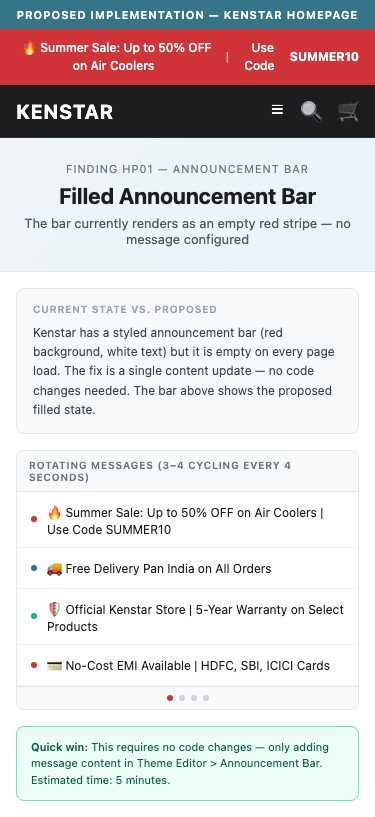
Proposed Implementation — Kenstar Homepage
Observations
- Kenstar has an announcement bar installed (red background, white text, centered layout) but it contains zero text content — the bar renders as a blank red stripe across the top of the page
- The bar exists in the theme and is styled (background: #d03438), but no announcement message, offer code, or USP has been configured — this is a missed opportunity on every pageview
- 9/10 electronics brands use the announcement bar for: free shipping threshold, active promo code, seasonal offer, or COD/EMI availability messaging
- An empty announcement bar wastes the highest-visibility above-the-fold slot on mobile, which is the first thing a new visitor sees
Recommendations
- Populate the announcement bar immediately with the most compelling current offer — e.g., 'Summer Sale: Up to 50% OFF on Air Coolers | Use Code SUMMER10 for Extra 10% OFF | Free Delivery on orders above ₹999'
- If there is no active promotion, use the bar for a permanent USP: 'Official Kenstar Store | Genuine Products | 5-Year Warranty | Free Delivery Pan India'
- Consider a rotating carousel bar (3-4 messages cycling) to communicate multiple USPs: Warranty, Delivery, EMI options, and Active Offers
Homepage lacks USP value proposition bar — brand differentiation not communicated above fold
Feature not present
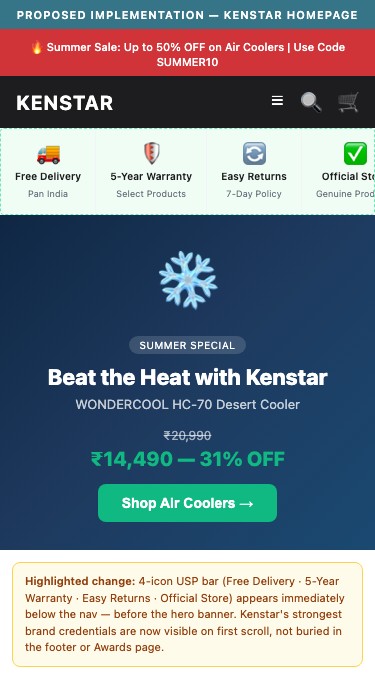
Proposed Implementation — Kenstar Homepage
Observations
- Kenstar's homepage has no USP bar (a horizontal strip below the header showing 3-4 key brand promises such as 'Free Delivery', 'Warranty Included', 'Easy Returns', 'Genuine Products')
- New visitors arriving from Google Ads or Instagram who have no prior brand familiarity need to quickly understand why to buy from Kenstar.in directly vs. Amazon or Flipkart — this context is entirely absent
- 9/10 electronics brands use a USP bar sitewide; for Kenstar specifically, trust markers like '5-Year Warranty', 'Official Brand Store', and 'Free Pan-India Delivery' would directly address buyer hesitation
- Kenstar has genuine brand credentials (awards, long history) that are buried in the 'Awards' page — these need to be surfaced at the top of every page
Recommendations
- Add a 4-icon USP bar below the header on all pages with: Free Delivery icon + 'Free Pan-India Delivery'; Shield icon + '5-Year Warranty'; Return icon + 'Easy 7-Day Returns'; Store icon + 'Official Brand Store'
- Make the USP bar sticky on mobile so it remains visible as users scroll — this ensures brand credentials are always in view during the browsing session
- Consider using the existing empty announcement bar slot for a rotating USP message until a dedicated USP bar can be designed
Review ratings hidden on product cards — shoppers cannot compare quality while browsing
Feature not present
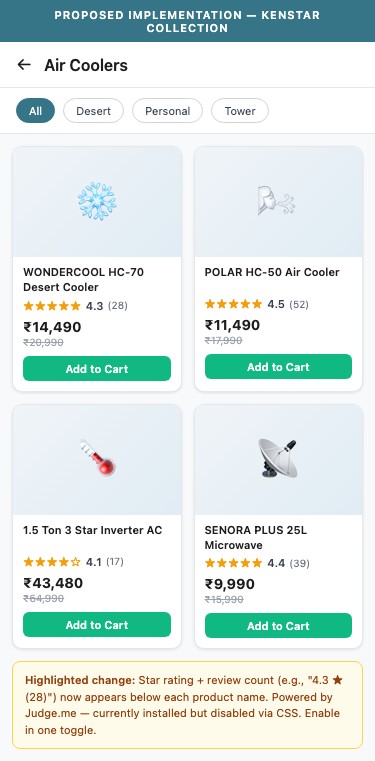
Proposed Implementation — Kenstar Collection
Observations
- Judge.me collection-page badges are explicitly disabled: preview_badge_collection_page_install_status is false, and the CSS rule .jdgm-preview-badge[data-template='collection']{display:none !important} confirms this
- Product cards on all collection pages (Air Coolers, Microwaves, ACs) show no star rating or review count, making it impossible for shoppers to differentiate product quality at a glance
- Without ratings on cards, shoppers must open each PDP individually to check reviews — adding friction and increasing bounce rate from collection pages
- Electronics buyers use review count as a proxy for popularity; hiding ratings removes a key visual trigger that drives click-throughs on collection pages
Recommendations
- Enable Judge.me collection page badges in the Judge.me admin dashboard — toggle the 'Show star rating on collection pages' setting to On
- Show rating as '4.3 ★ (28)' format below each product title on collection cards — this matches the format used by boAt, Crompton, and Bajaj Electricals
- Pair the rating display with the sale price to create a 'value + trust' combination that drives higher click-through rates from collection to PDP
Discount % badge absent from collection product cards — savings not visible while browsing
Feature not present
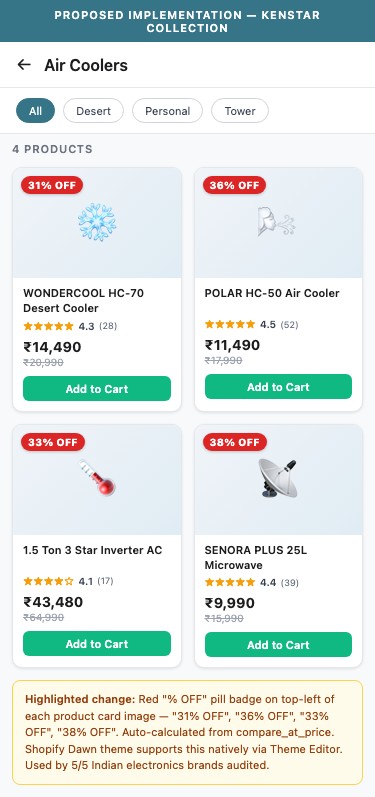
Proposed Implementation — Kenstar Collection
Observations
- Collection pages do not show a discount percentage badge on product cards — products with 40-52% savings from MRP display only the sale price, with the compare-at-price shown smaller but no 'X% OFF' badge
- Shoppers browsing the air cooler collection see prices like ₹12,490 and ₹14,490 but no visual cue that these are 44% and 31% below MRP respectively
- MRP strikethrough with % discount badge is used by 5/5 Indian electronics brands audited — it is the primary visual trigger that signals 'deal' to price-sensitive shoppers
- Adding a '44% OFF' badge to product cards increases collection-to-PDP click-through by making sale items stand out visually
Recommendations
- Add a discount percentage badge to the top-left or top-right corner of each product card image where a compare_at_price exists — calculate % as round((compare_at_price - price) / compare_at_price * 100)
- Use a contrasting color for the badge (red or green) that stands out against product imagery — style as a filled pill with white text: '44% OFF'
- Shopify Dawn theme supports sale badges natively — this can be enabled via theme editor without custom code; for % display, a small theme edit or badge app is needed
Customer review star ratings are hidden on PDPs despite Judge.me being installed
Feature not present
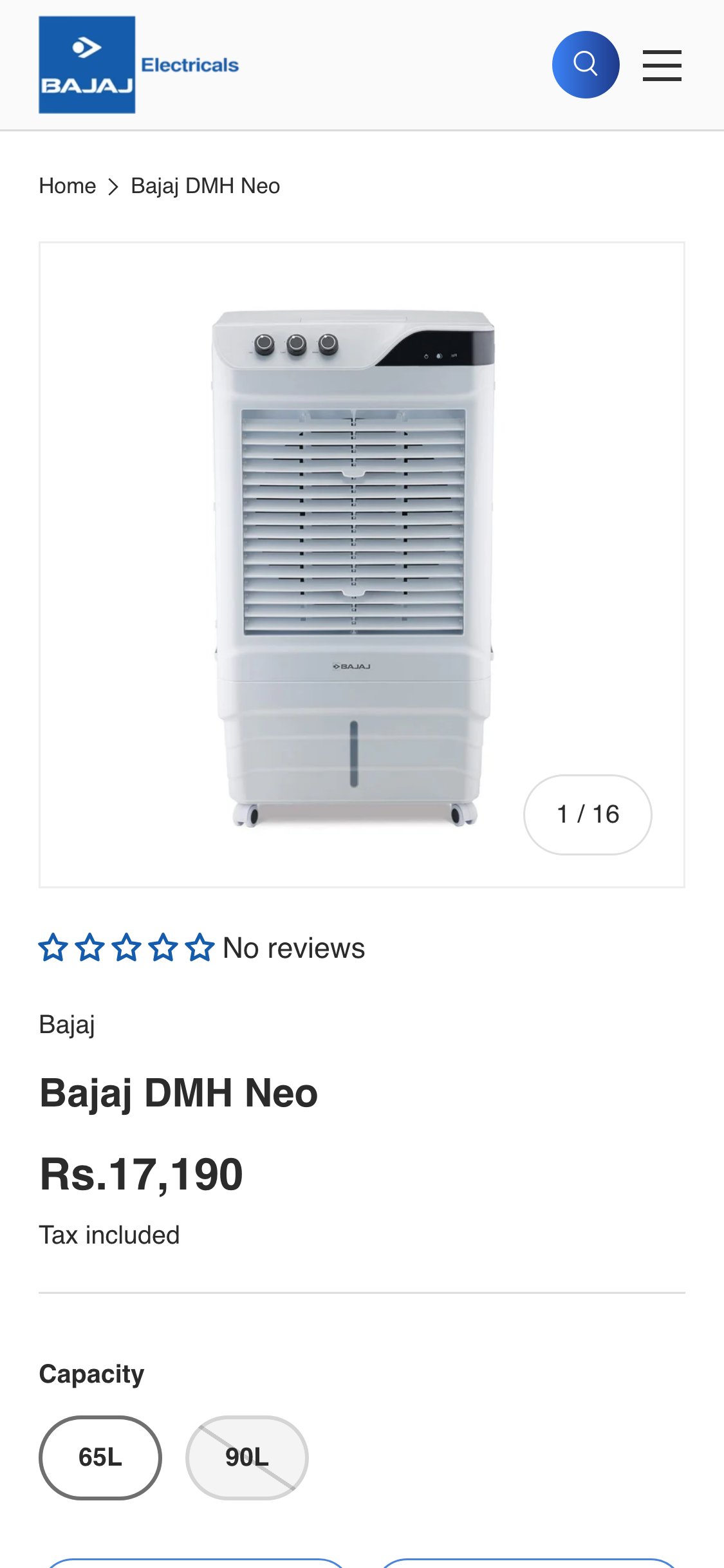
Bajaj Electricals — Mobile PDP showing star rating row (☆☆☆☆☆ No reviews) directly below product image, above product title
Observations
- Judge.me is installed and configured on kenstar.in, but a CSS rule explicitly hides all review widgets: .jdgm-preview-badge[data-template='product']{display:none !important} — ratings are suppressed via code
- The Judge.me widget install status on PDPs is set to false (preview_badge_product_page_install_status: false) — this is a configuration choice, not a technical error
- No customer review star rating or review count appears near the product title on any PDP — shoppers cannot quickly gauge product quality before buying
- 8/10 electronics brands show customer star ratings with review count near the product title; for Indian electronics, volume social proof (boAt shows 10K+ reviews) is a primary purchase trigger
Recommendations
- Enable the Judge.me preview badge on all PDPs: in the Judge.me admin, set the product page install status to active and remove the CSS override — this requires no additional app cost
- Position the rating widget directly below the product title (above the price) so it is the first trust signal shoppers see when landing on a PDP
- Aim to surface reviews for at least the top 20 bestselling SKUs first — even 5-10 reviews per product significantly reduces purchase hesitation
Discount % badge absent from PDPs despite 40-48% price gaps between sale and MRP
Feature not present
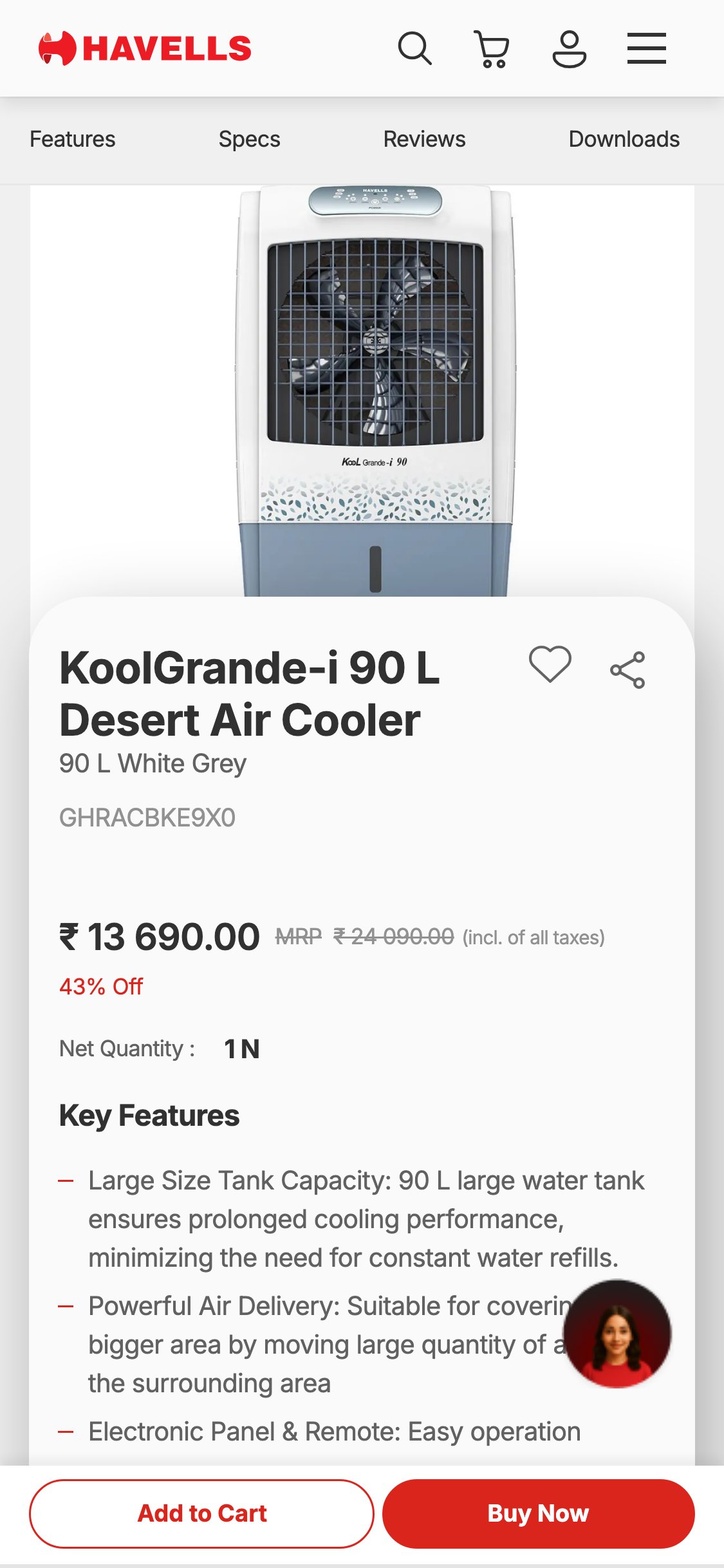
Havells — Mobile PDP showing sale price ₹13,690, MRP ₹24,090 strikethrough, and '43% Off' badge in red
Observations
- Kenstar PDPs show a sale price and a compare-at price (e.g., Microwave: ₹15,428 vs ₹28,990; Desert Cooler: ₹14,490 vs ₹20,990) but display no percentage savings badge such as '47% OFF' or 'Save ₹13,562'
- The price gap on many products ranges from 40-52% — these are compelling savings figures that are completely invisible to shoppers scanning the page
- In the Indian market, MRP strikethrough with explicit % savings is used by 5/5 India electronics stores audited — it is the primary urgency trigger for appliance purchases
- Without a visible discount badge, shoppers must manually calculate the savings amount, reducing the perceived value of the offer
Recommendations
- Add a prominent '47% OFF' or 'Save ₹13,562' badge adjacent to the sale price on all PDPs where compare_at_price exceeds sale price — this is achievable via theme customization or a Shopify discount badge app
- Display all three data points near the price: Sale Price (large) + MRP strikethrough (smaller, grey) + % OFF badge (colored pill) — Croma's pricing layout is the gold standard for this format
- Keep displayed discounts below 50% for credibility — Kenstar's current pricing is well within this range (40-48%)
Spec icons absent from PDPs — key purchase decision data buried in text description
Feature not present
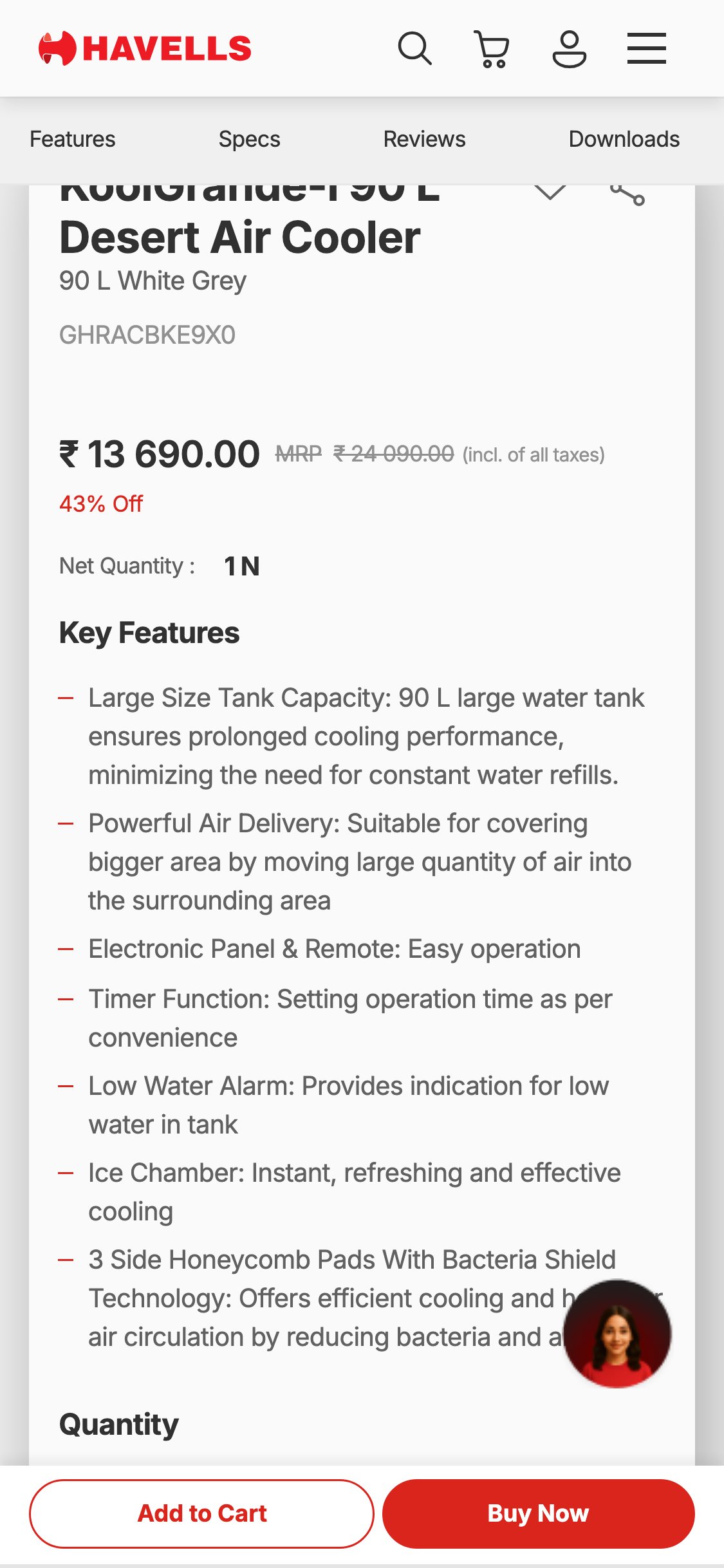
Havells — Mobile PDP showing Features/Specs/Reviews tab navigation and structured Key Features list below product title
Observations
- Kenstar PDPs display product specifications exclusively as paragraphs of text in the product description (e.g., '145 watts BLDC motor', '40.6 cm fan', '3-year warranty') — no visual spec icon strip exists
- On mobile, shoppers must scroll through multiple paragraphs to find key decision specs — wattage, tank capacity, BEE energy star rating, warranty duration
- 9/10 electronics brands use a scannable visual spec strip below the product title with icons for key metrics — this allows shoppers to evaluate fitness-for-purpose in under 5 seconds
- For ACs (₹43K-₹55K) and large coolers (₹10K-₹16K), specs like tonnage, BEE star rating, and air delivery (m³/hr) are the primary purchase triggers — they must be immediately visible
Recommendations
- Add a 4-6 icon spec strip below the product title on all PDPs — for coolers: Tank Capacity, Air Delivery, Power (W), Warranty; for ACs: Tonnage, BEE Energy Star Rating, Cooling Capacity, Warranty; for microwaves: Capacity (L), Power (W), Functions, Warranty
- Use simple icon + number + label format (similar to boAt's spec strip) rather than paragraphs — each spec takes up one icon block with a vector icon, the metric value, and a one-word label
- Note: ensure AC spec strips label ratings clearly as 'BEE Energy Stars' (not 'customer review stars') to avoid shopper confusion between energy efficiency and product ratings
Trust badges absent from PDP buy zone — warranty and returns info not visible near ATC
Feature not present
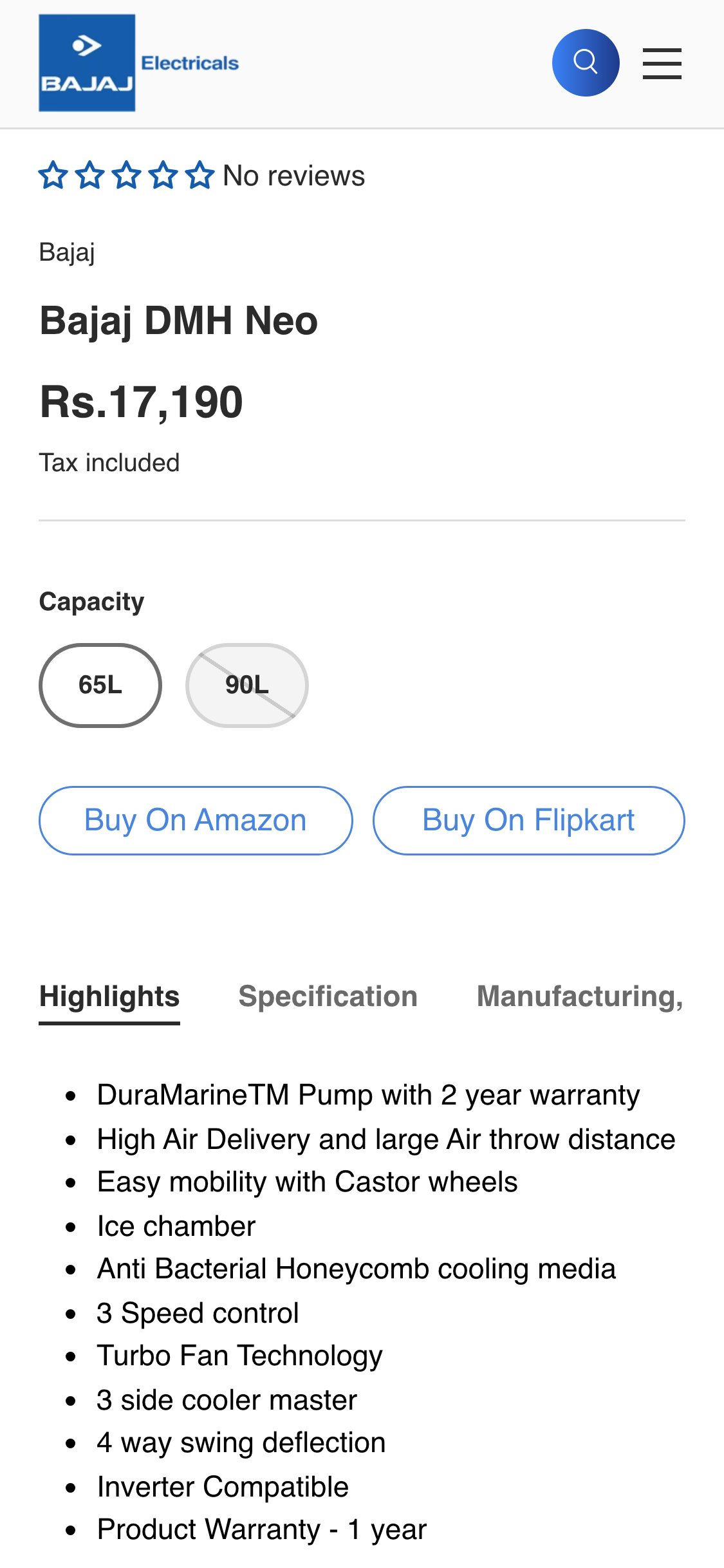
Crompton — Mobile PDP showing 4-icon trust strip: Buy In Store Or Online, Service And Installation, Product Warranty, Top Rated Products
Observations
- No warranty badge, returns policy badge, or 'Genuine Product' trust indicator appears in the buy zone (near the Add to Bag button) on any Kenstar PDP
- Kenstar products carry strong warranties (e.g., 5-year motor warranty on coolers, 10-year compressor on ACs) but these are only mentioned in the product description text — not visible as trust badges near the CTA
- For Indian consumers buying appliances above ₹5K-₹50K, trust signals near the buy button are essential — 7/10 electronics stores globally (5/5 India-specific) show warranty/returns badges below ATC
- The absence of trust badges creates hesitation at the final purchase decision point, particularly for first-time Kenstar customers who may be unfamiliar with the brand
Recommendations
- Add a 4-icon trust strip directly below the 'Add to Bag' button on all PDPs: (1) Warranty badge showing warranty duration, (2) Easy Returns badge with return window, (3) Genuine Product / Official Store badge, (4) Free Delivery badge
- For high-AOV products (ACs, washing machines), surface the specific warranty terms inline: '10-Year Compressor Warranty' for ACs, '5-Year Motor Warranty' for coolers — specificity builds more trust than generic 'warranty included' text
- Use icon + short text format matching boAt's trust strip layout — keep each badge to under 4 words for mobile readability
No EMI or installment option surfaced on PDPs — high-AOV products need monthly payment display
Feature not present
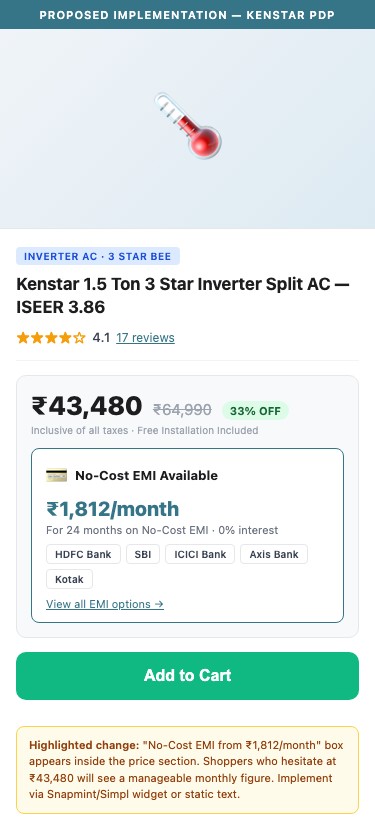
Proposed Implementation — Kenstar PDP
Observations
- Kenstar's ACs range from ₹43,480 to ₹54,833 and large coolers from ₹10,990 to ₹15,990 — at these price points, Indian shoppers strongly prefer to see EMI options before deciding to purchase
- No EMI calculator, no 'Starting from ₹X/month' text, no Snapmint/Simpl/Cardless credit widget appears anywhere on PDPs
- 4/5 Indian electronics brands audited show EMI options on PDPs; for products above ₹999 this is considered a must-have in the Indian D2C market
- Hiding the monthly payment cost creates a psychological barrier — a shopper who balks at ₹45,000 may readily purchase when shown '₹1,875/month for 24 months'
Recommendations
- Integrate Snapmint or Simpl Buy Now Pay Later on the storefront — both support Shopify and display a monthly EMI callout near the price or below the ATC button
- At minimum, add static text near the price showing estimated EMI: 'EMI starting from ₹1,875/month | No-Cost EMI on major credit cards' — even without a live calculator this reduces purchase hesitation
- For AC products specifically, add bank offer messaging (HDFC/SBI/ICICI card EMI offers are standard in Indian appliance retail) — this bridges Kenstar to the Croma/Amazon buying experience Indian shoppers are accustomed to
Lead-gen touchpoints missing for high-AOV products — no callback, price alert, or store locator
Feature not present
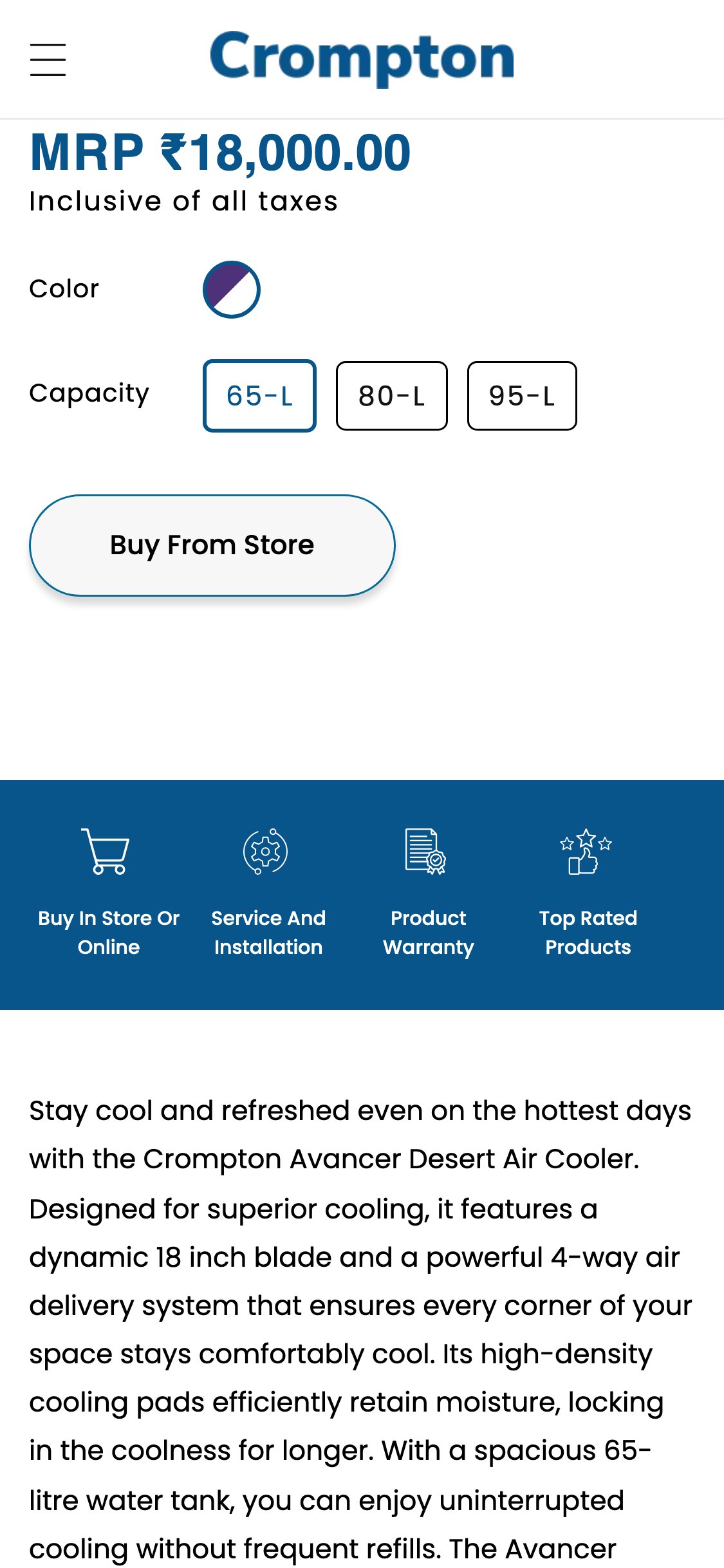
Crompton — Mobile PDP showing 4-icon engagement strip below ATC: Buy In Store Or Online, Service And Installation, Product Warranty, Top Rated Products
Observations
- For Kenstar's ACs (₹43K-₹55K) and large appliances, many shoppers will research online without purchasing in a single session — no mechanism exists to capture this intent
- Kenstar's PDP offers only 'Add to Bag' with no alternative engagement: no 'Request a Callback' button, no 'Notify Me on Price Drop', no 'Find Nearest Dealer/Service Center'
- Croma implements Reserve + Store Locator on high-AOV PDPs; 2/10 D2C electronics brands use this pattern — but it is considered best practice for all products above ₹10K AOV
- Without lead-gen touchpoints, Kenstar loses high-intent shoppers who are not ready to purchase immediately — these visitors leave with no re-engagement path
Recommendations
- Add a 'Request a Callback' button below the ATC on AC and washing machine PDPs — capture name + phone number and follow up within 24 hours; this is the equivalent of an in-store sales consultant for high-AOV appliances
- Add a 'Notify Me on Price Drop' or 'Set Price Alert' feature for out-of-stock or high-AOV products — Shopify apps like PriceSpy or Back in Stock support this
- Add a 'Find Service Center' link on AC/appliance PDPs linking to the existing Service & Support page — this reduces post-purchase anxiety and increases purchase confidence
No customer photo reviews visible on PDPs — UGC social proof not leveraged
Feature not present
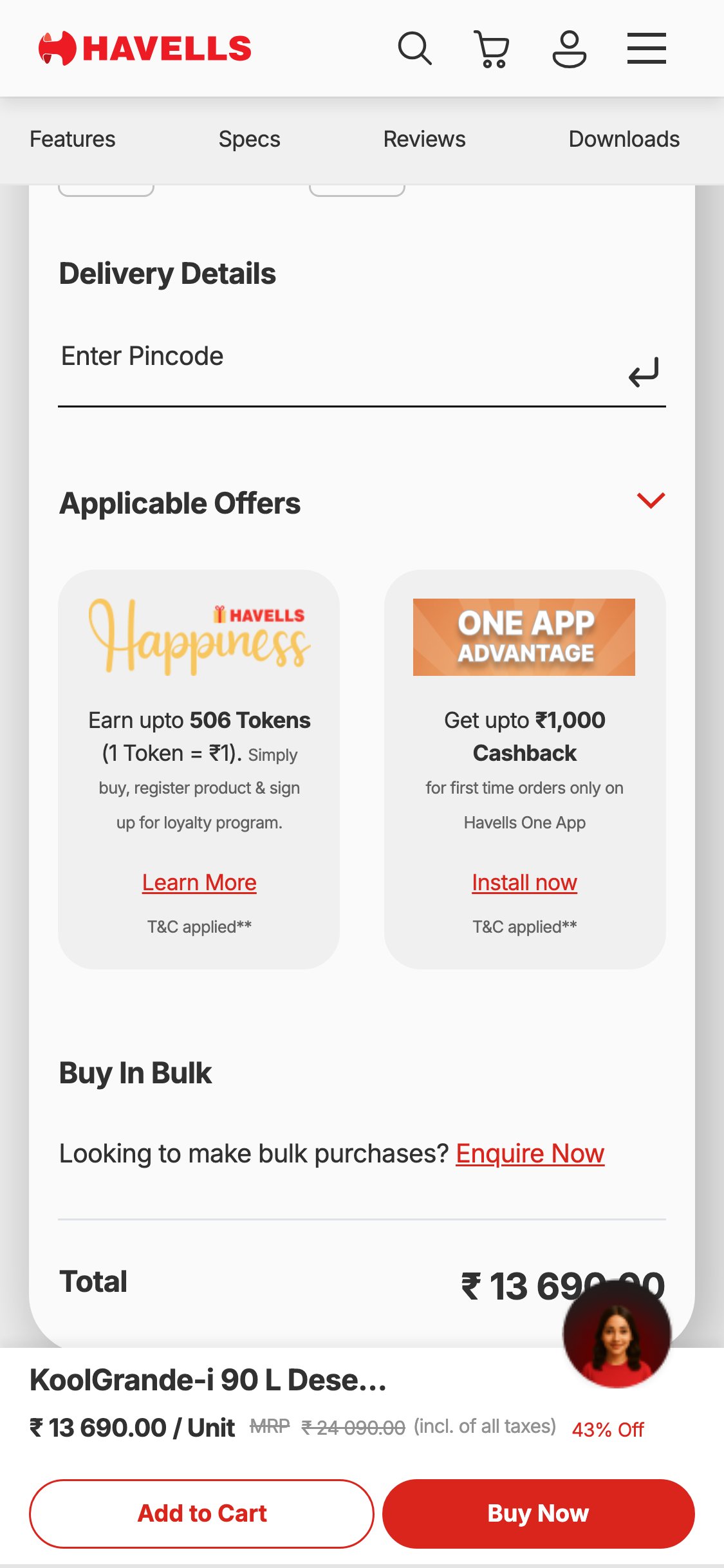
Havells — Mobile PDP showing Applicable Offers expanded + Customer Reviews section heading in structured accordion layout
Observations
- Judge.me is configured with photo and video reviews enabled (enable_review_pictures: true, enable_review_videos: true), but the review widget itself is suppressed via CSS, meaning even if photo reviews exist, shoppers cannot see them
- Customer-submitted photos of products in-use are among the strongest purchase triggers for appliances — a photo of a cooler set up in a living room gives size reference and real-world proof
- The review section widget container exists in the DOM (.jdgm-rev-widg) but with visibility:hidden applied to the title and summary elements — this indicates the feature was deliberately disabled
- Without UGC photo reviews, Kenstar's product pages lack the social proof that Indian buyers look for before spending ₹10K-₹55K on an appliance
Recommendations
- Re-enable the full Judge.me review widget on PDPs by removing the CSS display:none and visibility:hidden overrides, and setting the widget install status to active in Judge.me settings
- Run a post-purchase email campaign asking existing customers to submit photo reviews — offer a ₹100-₹200 discount on next purchase as incentive; seed at least 5 photo reviews per top-selling SKU
- Feature the 3 most visually compelling photo reviews in a prominent 'Customer Photos' gallery above the full review section — this maximizes UGC impact on the PDP
Cross-sell absent from cart — no accessory or complementary product recommendations
Feature not present
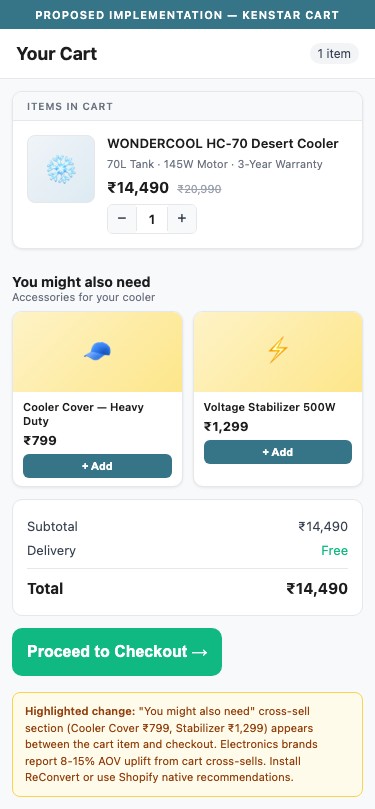
Proposed Implementation — Kenstar Cart
Observations
- The Kenstar cart page contains no product recommendations, cross-sell widgets, or accessory suggestions — a shopper who adds an air cooler to cart sees only the item, quantity, and checkout button
- For appliances, logical cross-sells exist: a cooler buyer could be shown a water cooler cover, a stabilizer, or a smaller personal cooler for another room; a microwave buyer could see a microwave-safe dish set or OTG
- Electronics brands with cross-sell in cart report 8-15% average order value uplift; Kenstar's catalog has sufficient breadth (226 products across multiple categories) to support meaningful recommendations
- No cross-sell or Frequently Bought Together app is installed on the store
Recommendations
- Install a cross-sell/upsell app (ReConvert, CartHook, or Frequently Bought Together) and configure product-level cross-sell rules: Cooler → Cooler Accessories; Microwave → Cookware; Iron → Garment Steamer
- Alternatively, configure Shopify's native 'You might also like' product recommendations widget in the cart drawer and /cart page — this requires no additional app for basic functionality
- Keep recommendations to 2-3 items maximum in the cart to avoid choice paralysis — focus on accessories under ₹2,000 that have high attach rates
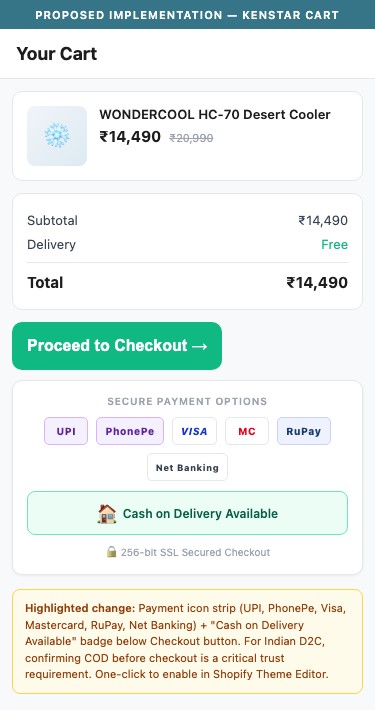
Payment trust icons absent from cart — UPI, COD, and card options not surfaced before checkout
Feature not present
Proposed Implementation — Kenstar Cart
Observations
- The Kenstar cart page and footer display no payment method icons — shoppers cannot confirm before clicking checkout whether UPI, COD, credit/debit cards, or net banking are accepted
- For Indian D2C buyers, confirming COD availability before checkout is a trust requirement — many shoppers will abandon if they cannot verify COD is offered without proceeding to checkout
- No payment icon strip (UPI logo, Visa/Mastercard, RuPay, COD badge) appears in the cart, product pages, or footer — the only visible payment reference is the Shopify 'Portable Wallets' config in the backend
- 7/10 electronics brands globally surface payment icons in the cart; for India-market stores this is near-universal
Recommendations
- Add a payment icon strip in the cart page below the 'Proceed to Checkout' button showing: UPI logo, Visa, Mastercard, RuPay, Net Banking, COD badge — use Shopify's built-in payment icons or a free SVG icon set
- Add the same payment icon strip to the product page trust badges section and the footer — this reduces abandonment at three key points in the funnel
- Add explicit 'Cash on Delivery Available' text if COD is supported — this single line of text is among the highest-ROI trust signals for Indian D2C appliance brands
No urgency triggers in cart — stock levels and time-sensitive offers not surfaced
Feature not present
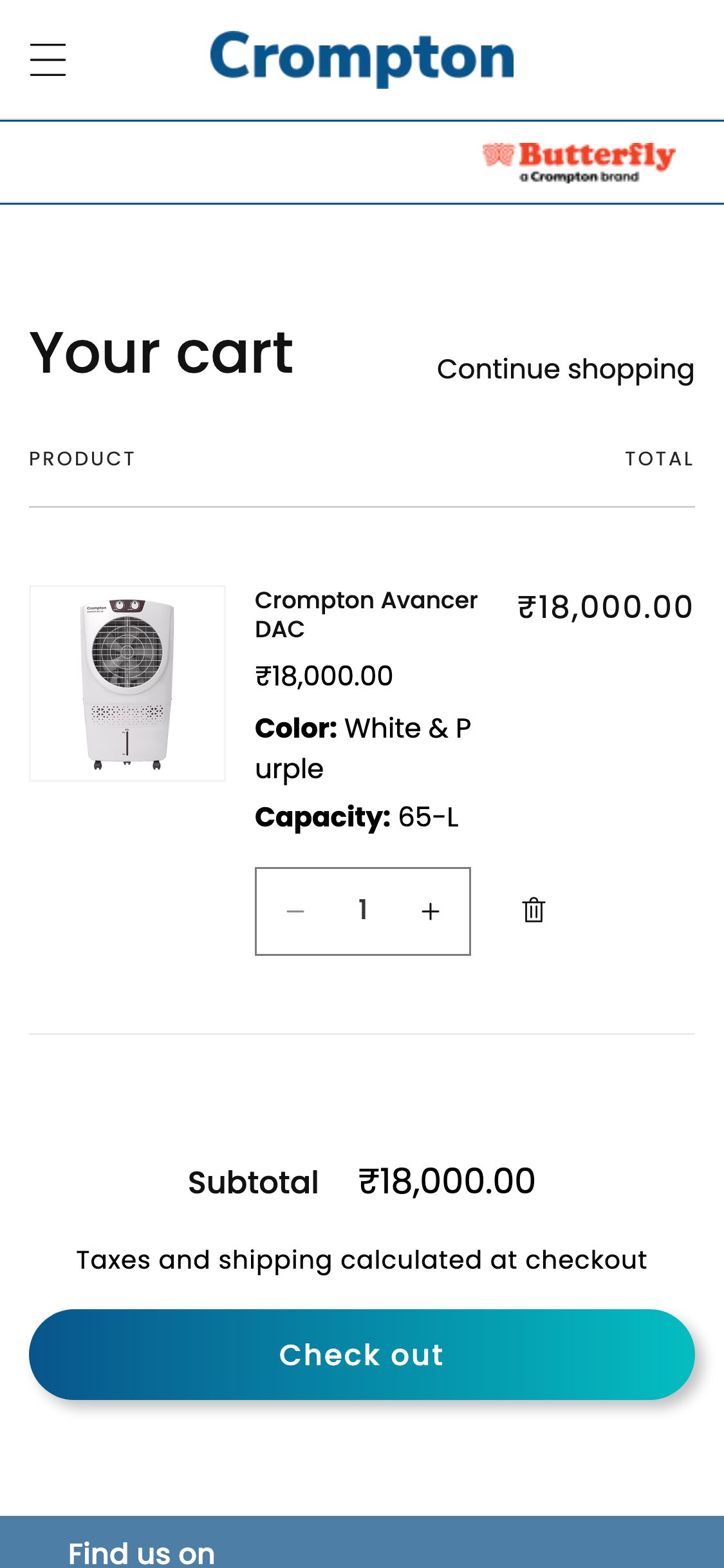
Crompton — Mobile cart page showing cart with item (Avancer DAC ₹18,000), clean checkout layout — absence of urgency signals shown for contrast
Observations
- The Kenstar cart page has no scarcity or urgency signals — no 'Only 3 left in stock', no countdown timer for sale pricing, no 'X people viewing this product' social proof
- For a brand running 40-48% discounts, a 'Sale ends in X hours' countdown in cart would directly increase checkout completion rates
- Indian appliance buyers are highly responsive to stock scarcity messaging — the threat of a product selling out before delivery is a strong motivator during peak seasons (pre-summer for coolers)
- Cart-to-checkout conversion for electronics sits at p50 of 28% — urgency triggers in cart are a proven lever to push this above the 38% p75 threshold
Recommendations
- Add low-stock badges on cart line items for products with fewer than 10 units: 'Only 4 left — order soon' — this is configurable via Shopify's inventory metafields or a cart customization app
- For sale products, add a subtle countdown banner in the cart: 'Sale prices valid until [date] — complete your order to lock in savings'
- Add a 'X people have this in their cart' social proof signal near high-demand products in cart — apps like Fomo or Sales Pop support this for Shopify
05
App Ecosystem
What's installed vs what's missing from best-in-class Electronics & Home Appliances stores
Present (11)
Judge.me Product Reviews
Reviews & Social Proof
USF — Unlimited Search & Filter (HotYon)
Search & Filter
Google Tag Manager (GTM-TK2335VG)
Analytics & Tag Management
Google Analytics 4
Analytics
Facebook Pixel (ID: 685745059317749)
Advertising & Retargeting
Google Ads Conversion Tracking
Advertising
Instafeed
Social Proof — Instagram Feed
Globo Form Builder
Forms & Customer Feedback
Blocky App
Analytics & Cart Tracking
Shopify Web Pixels Manager
Analytics
Google reCAPTCHA v2
Security
Missing (8)
WhatsApp Chat Widget (Interakt / WATI / DelightChat) Critical
Customer Support & Pre-Purchase Assistance
📈 Reduces pre-purchase drop-off by 20-35%
68% of Indian D2C electronics brands use WhatsApp as a pre-purchase support channel
EMI / BNPL Widget (Snapmint / Simpl / ZestMoney) Critical
Payments & Financing
💰 High-AOV conversion uplift 15-25% for products above ₹5K
4/5 Indian electronics D2C brands show EMI options on PDP for products above ₹999
Cross-Sell / Upsell in Cart (ReConvert / Frequently Bought Together) Critical
Average Order Value
💰 Average order value uplift 8-15% via accessory cross-sells
7/10 electronics stores globally implement cart cross-sell; Kenstar has 226 SKUs with natural accessory relationships
Email / SMS Pop-up for Lead Capture (Klaviyo / Spin-to-Win) Critical
Email & SMS Marketing
🔄 Captures 3-8% of anonymous visitors as email subscribers for retargeting
6/10 Indian D2C brands use email capture pop-ups with incentive (discount code or early access)
Loyalty & Rewards Program (Smile.io / LoyaltyLion) Critical
Customer Retention
🔄 Repeat purchase rate uplift 15-25% and increased customer LTV
3/10 electronics brands use gamified loyalty; growing trend among Indian D2C brands (boAt, Noise, Noise)
Product Comparison Tool (Comparify / custom) Critical
Conversion Optimization
📈 Reduces decision paralysis for multi-SKU categories (ACs, coolers) by 10-20%
2/10 D2C electronics brands have this; Croma uses it for AC tonnage comparisons — critical for Kenstar's multi-variant AC and cooler lineup
Back in Stock / Price Drop Alert (Back in Stock / PriceSpy) Nice-To-Have
Lead Generation for High-AOV
💰 Recovers 5-10% of high-intent shoppers who browse but do not purchase
2/10 electronics brands have price alert; recommended for all products above ₹10K AOV per industry best practice
Trust Badge App (Trust Hero / McAfee SECURE) Nice-To-Have
Conversion — Trust
📈 Reduces checkout abandonment by 3-7% via visible trust signals near ATC
7/10 electronics stores globally display trust badges near the buy button; 5/5 India-specific stores audited have this
App Stack Assessment
11 apps detected, 8 critical gaps identified
Confidential — Prepared for Kenstar by Growisto | April 2026